
Document information
| Document ID: | 4579 |
|---|---|
| Subject: | How do I add an additional IP address in Windows 2000/2003 Server? |
| Creation date: | 12/14/15 4:35 PM |
| Last modified on: | 1/12/22 3:56 PM |
How do I add an additional IP address in Windows 2000/2003 Server?
IMPORTANT: You do not have to add a physical network card in order to add an IP address.
The following article explains how to add an additional IP address to your Windows2000/2003 server.
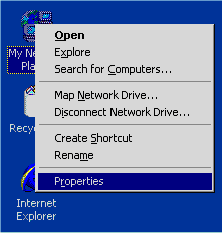
- Locate the My Network Places icon on your desktop, right click and select Properties.
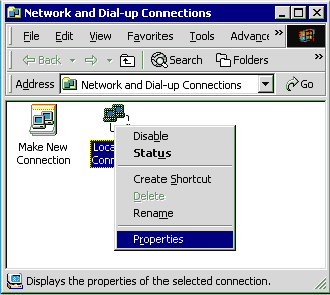
- To open the network properties dialog, right-click on Local Connection. Select Properties.
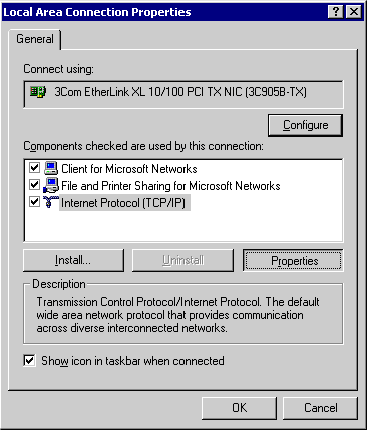
- Select Internet Protocol (TCP/IP) and click Properties.
- Click Advanced.
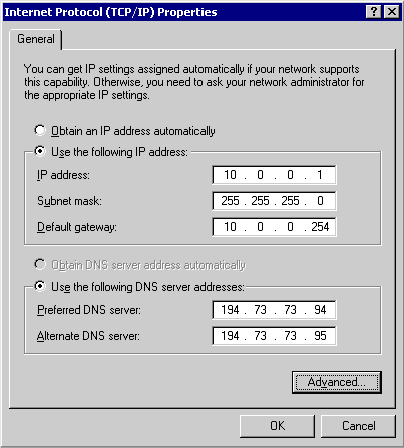
- Click Add, enter the new IP address and corresponding Subnet mask.
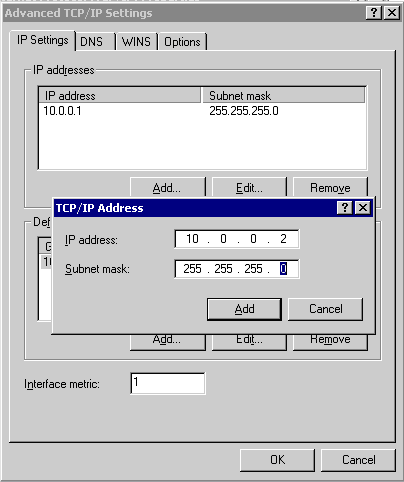
- Click Add.
Add a comment to this document
Do you have a helpful tip related to this document that you'd like to share with other users?
Important: This area is reserved for useful tips. Therefore, do not post questions here. Instead, use our public forums to post questions.