
Document information
| Document ID: | 4580 |
|---|---|
| Subject: | How to change port 25 to any other port in Microsoft Exchange |
| Creation date: | 12/14/15 4:35 PM |
| Last modified on: | 4/12/22 12:26 PM |
How to change TCP/IP port from 25 to any other value in Microsoft Exchange
To change the SMTP listening port on a server that is running Exchange 2000 or Exchange 2003 from port 25 to another port, for example, port 2500, follow these steps:
- Start the Exchange System Manager.
- Locate and click Servername, click Protocols, and then click SMTP.
- Right-click the Default SMTP Virtual Server object, and then click Properties.
- On the General tab, click the Advanced button, click the Edit button, and then set the Transmission Control Protocol (TCP) port to 2500 (or whatever new value you require).
This method sets the port that this virtual server listens to for SMTP traffic.
Changing port for Exchange 2013 and 2016
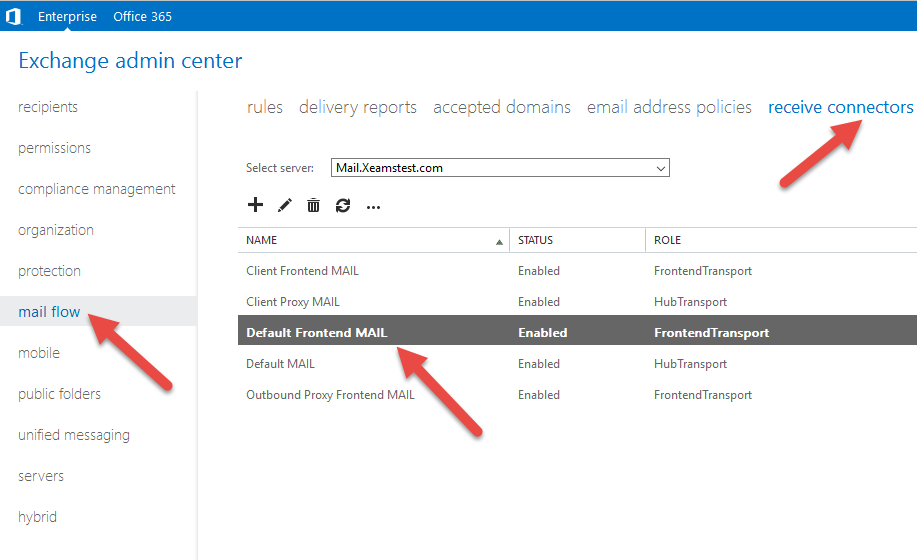
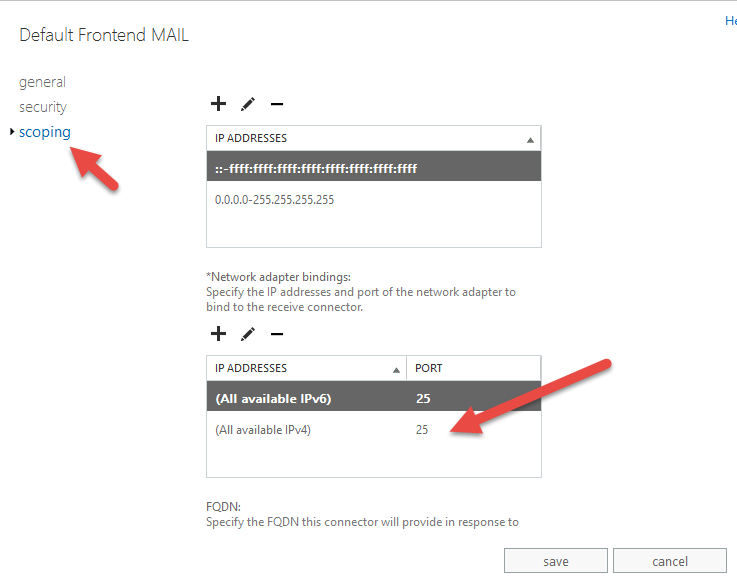
Newer versions of Exchange has a concept of Connectors. You must configure the appropriate connector in order to change the default ports. For example, the "Default Frontend ServerName" is the connector that typically listens on port 25.Following screen show this setting in MS Exchange 2016
 Select the Scope link on the following page to modify the port number.
User comments
Posted by Bob Koure on 6/17/13 8:56 AM
To change the inbound port on Windows SBS 2007 (Exchange 2007)
(probably the same on straight-up Exchange 2007)
Open the Exchange Management Console.
Go to server configuration / hub transport.
Find the tab labeled "Receive Connectors", if it's not in the forefront, click it.
For each connector listed (there can be several)
Right click the connector and pick 'Properties'.
Select tab 'Network'.
In the top window, there should be a list of IP addresses with port. If any of these are port 25, highlight that line, click 'Edit' and change the 'Port' field.
Add a comment to this document
Do you have a helpful tip related to this document that you'd like to share with other users?
Important: This area is reserved for useful tips. Therefore, do not post questions here. Instead, use our public forums to post questions.