
Document information
| Document ID: | 4549 |
|---|---|
| Subject: | What is the difference between SMTP Server and SMTP Proxy Server |
| Creation date: | 12/14/15 4:35 PM |
| Last modified on: | 1/18/22 9:51 AM |
Regular SMTP and SMTP Proxy Server
Important! SMTP Proxy Server will be deprecated in the future. We recommended you the Regular SMTP Server. Please check here for more details.
Xeams offers two types of SMTP Servers:- Regular SMTP Server
- SMTP Proxy Server
Regular SMTP Server
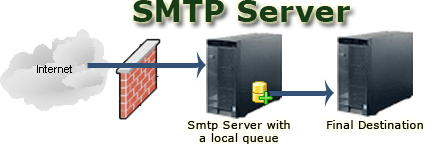
This Server can be used in all 3 operating modes (Stand-alone, Spam Firewall and Hybrid) of Xeams
When should you use Smtp Server?
Consider using the SMTP Server when:- You are using Xeams in Stand-alone mode. In this mode Xeams does not require any other email server and therefore, you cannot use the SMTP Proxy Server, OR
- When you want Xeams to distribute incoming emails to more than one server. For example, domain1.com goes to MS Exchange and domain2.com goes to a QMail server, OR
- You want to provide redundancy for your primary email server.
The regular SMTP server can be used in all 3 modes (Stand-alone, Firewall as well as Hybrid)
SMTP Proxy Server
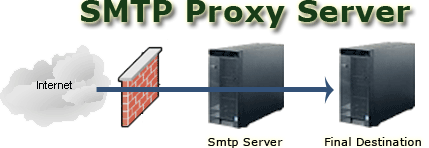
This Server cannot be used in Stand-alone mode. It can only be used in Spam Firewall and Hybrid modes.
When should you use SMTP Proxy Server?
Consider using SMTP Proxy Server when:- Xeams is NOT the final destination for in-bound emails. Consider the scenario where you are using Microsoft Exchange as your email server and want to use Xeams to filter spam.
- You are using Xeams in Firewall or Hybrid mode.
- You have users on the Internet (outside your company's network) who want to use your email server to send their outbound messages and you want to them to authenticate before accepting their message.
The SMTP proxy server cannot be used in Stand-alone mode.
Add a comment to this document
Do you have a helpful tip related to this document that you'd like to share with other users?
Important: This area is reserved for useful tips. Therefore, do not post questions here. Instead, use our public forums to post questions.