
Document information
| Document ID: | 4615 |
|---|---|
| Subject: | Preventing message loops in SMTP server |
| Creation date: | 12/14/15 4:35 PM |
| Last modified on: | 5/12/22 10:57 AM |
Understanding and preventing message loops
Email messages, by design, hop from one SMTP server to another. Often misconfiguration in one or more servers can cause messages to get stuck in a loop. Meaning server A sends a message to server B, which sends it back to A.
The following section describes how message loops are created in Xeams and ways to prevent them
Scenario 1
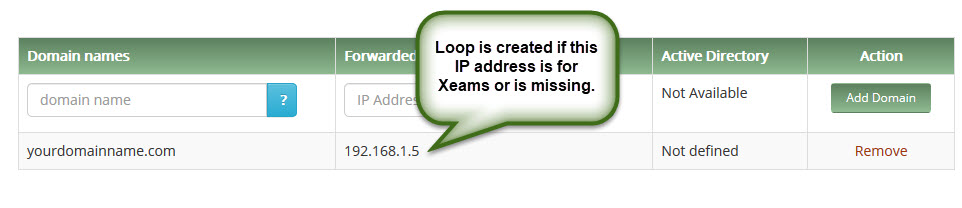
You are using Xeams in Hybrid-mode and the forward to IP address is either missing or is defined as the IP address of Xeams itself. Refer to the image below:
Analysis
In Hybrid mode, Xeams forwards messages to another server. When configuring local domains, you need to specify the IP address of the actual server where messages should be forwarded.This Forward to IP Address goes into a local DNS file. Xeams does not contact a DNS server for MX lookup if the domain/IP is found in this local DNS file.
When a forward to IP is missing or is specified as the machine where Xeams is running, messages will loop back to Xeams creating a loop.
Steps to prevent this situation
Ensure the forward to IP address is correctly specified in local domain configurationScenario 2
You are using Xeams in Firewall mode and are using SMTP Proxy server. Besides Inbound messages, you want to use Xeams to handle outbound messages as well. You configured your actual SMTP server to forward outbound messages to Xeams.
Analysis
If your actual SMTP server forwards all outbound traffic to Xeams' SMTP Proxy server, it will send the message back to your actual server, creating a message loop.Steps to prevent this situation
If you need Xeams to handle outbound messages, use the regular SMTP server rather than Xeams. Following steps show how to do this.- Assign a new IP address to the machine where Xeams is running
- Configure Xeams SMTP Server to listen on this IP address. Once this is done, the SMTP Proxy server will handle inbound emails and SMTP Server will handle outbound messages
- Configure your actual email server to forward messages to the new IP address you just added to your Xeams box.
Add a comment to this document
Do you have a helpful tip related to this document that you'd like to share with other users?
Important: This area is reserved for useful tips. Therefore, do not post questions here. Instead, use our public forums to post questions.