
Document information
| Document ID: | 4648 |
|---|---|
| Subject: | Notification/Quarantine Reports |
| Creation date: | 12/14/15 4:35 PM |
| Last modified on: | 1/18/22 9:47 AM |
Quarantine reports
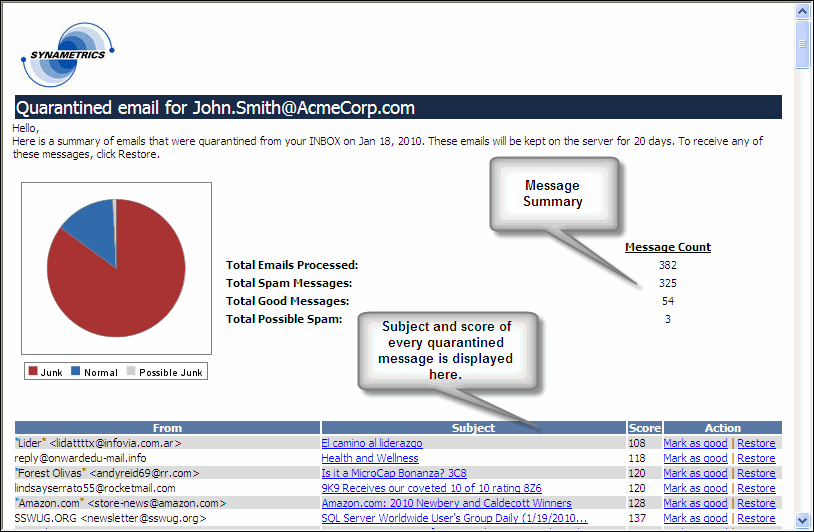
Xeams can automatically send quarantine reports containing a summary of emails that have been quarantined for a user. This email contains the subject, sender and score of the actual message. Using this report, an individual can restore any message that is incorrectly quarantined by the system. They can also mark a message as good to prevent it from getting blocked in the future.
This report is sorted by score. Messages with a lower score have a higher probability of getting blocked incorrectly therefore, users only need to look at the first few messages. Messages that appear towards the bottom are almost always junk.
When are these reports sent?
By default, Xeams sends this report at midnight containing a list of emails that were quarantined in the previous day. Follow the steps below to change this default behavior.- Log in to Admin Console
- Click Manage Users under Server Configuration
- Click Edit next to the desired user
- At the bottom, specify the time(s) you want Xeams to generate this report. You can specify up to 5 different times. Refer to the image below:

Bulk modification
Follow the steps below to modify the report schedule for every user.
- Log in to Admin Console
- Select Manage Users under Server Configuration
- Click Modify report schedule towards the top
User comments
Posted by Alberto de_la_Torre on 10/2/14 11:15 AM
I found that I had to configure Forefront for Exchange as follows:
Policy Management
AntiSpam-Configure
Configure Content Allow Lists
Allowed Senders
Added notifications@synametrics.com
Don't forget to click save at the top of the page.
Add a comment to this document
Do you have a helpful tip related to this document that you'd like to share with other users?
Important: This area is reserved for useful tips. Therefore, do not post questions here. Instead, use our public forums to post questions.