
Document information
| Document ID: | 4555 |
|---|---|
| Subject: | Sender Policy Framework (SPF) |
| Creation date: | 12/14/15 4:35 PM |
| Last modified on: | 3/8/22 3:41 PM |
Sender Policy Framework (SPF)
Sender Policy Framework (SPF), formerly Sender Permitted From, is an extension to the SMTP standard. SPF makes it easy to counter most forged "From" email addresses, and helps counter e-mail spam. The combination is also called SMTP+SPF.How SPF works
SPF is a mechanism where domain owners announce where an email can come from, for their domain. This announcement is done through a DNS server. For example, Microsoft exposes their SPF record in their DNS, which lists a set of IP addresses where an email can originate if the domain name is microsoft.com. If a message comes from any other IP address it should be considered as a forgery.Creating an SPF record for your domain
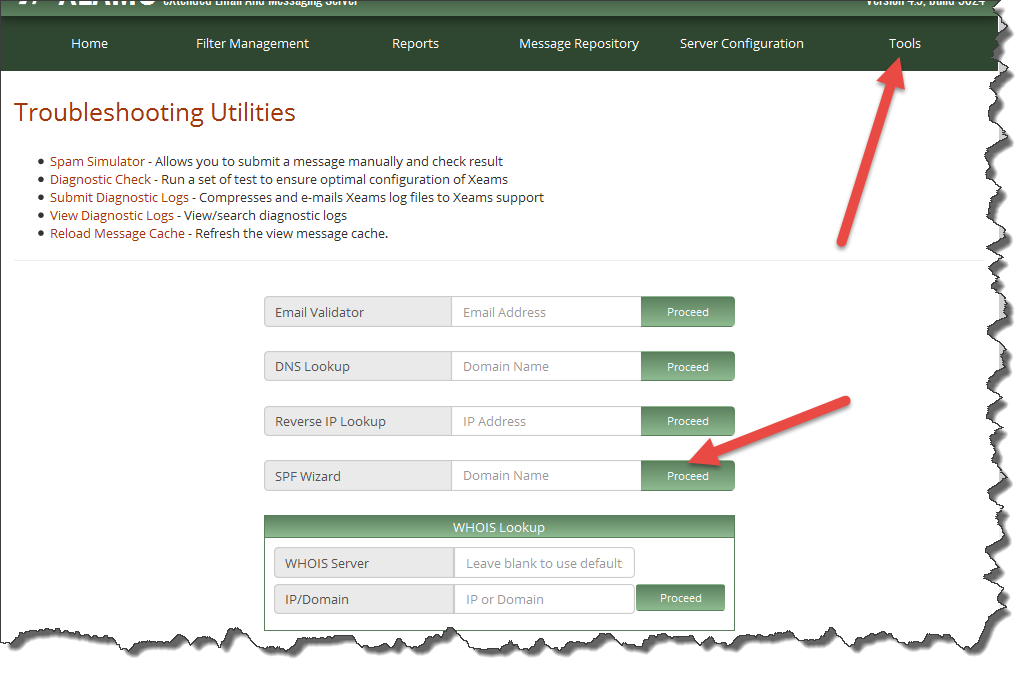
Xeams comes with an SPF wizard that allows you to create an SPF string. Once the string is created, you need to create a TXT record in your DSN with this string. The following steps show you how to use this wizard.- Log in to the Admin Console
- Click Tools on the main menu (Do not click any item in the pop-up menu - click Tools itself)
- Scroll down and type your domain name for SPF Wizard and click Proceed
- The generated string must be added in your DNS server as a TXT
record
Examples
Here are some examples if you wish to create records manually.Example 1:
Assume every outbound email goes through your email server. In that case, your SPF record will look like:v=spf1 mx ~all
Example 2:
Assume you have a third-party company that sends outbound emails on your behalf and their public IP address is 201.202.203.204. In that case, your SPF record will look like:v=spf1 mx ip4:201.202.203.204/32 ~all
Example 3:
Taking the above examples one step further, assume you have outsourced your HR department to another company that also uses SPF and can send emails on your behalf. The domain name of that company is friendlyHR.com. In that case, the SPF record will become:v=spf1 mx ip4:201.202.203.204/32 include:friendlyhr.com ~allNotice the ending
~all at the end of each record. This means a SOFTFAIL. An alternative approach is to use a -all, which
indicates a FAIL. Receiving server will most likely reject any incoming message that fails an SPF test and see a -all in the SPF
record. Further analysis will be performed when a ~all is used before considering it a forged message.
Bypassing SPF For Certain IP
Using the following method you could exclude certain IP from getting SPF-checked.
- Create a file called
INSTALL_DIR/config/SpfBypass.dat. $INSTALL_DIR refers to the installation folder of Xeams. - Enter the IP address of where emails are received from - one IP per line.
- Save the file and restart Xeams
Troubleshooting SPF
SPF depends on DNS lookup. Often companies use a public DNS servers like GoDaddy and put the SPF record in it. Additionally, they also use another DNS server for their LAN. Ensure both DNS servers have an SPF record if you have created a zone in your local DNS server.
Click Filter Optimization Wizard under Filter Management. This page will display every domain configured locally that does not have an SPF record. If you see an entry for your domain, that means Xeams is performing DNS lookups through a server that is authoritative for your domain but does not contain an SPF record.
Use the following steps:
- Log in as admin
- Click Diagnostic Check - Outbound under Tools
- Enter your domain name and proceed
This test will check SPF as well as DKIM signatures from your server
Related Links
- Using DKIM to sign out-bound emails
- Using DMARC with your email server
- How to use SPF, DKIM and DMARC
User comments
Posted by Gert Jürgensen on 9/23/16 2:51 AM
Posted by Cassio Simoes on 8/20/16 3:45 PM
Posted by Joel Simwinga on 8/16/16 9:04 AM
Posted by David Moore on 11/13/15 9:39 PM
Posted by Peter on 12/21/16 3:11 PM
Posted by Alex on 8/23/16 10:28 AM
Posted by Vojtech on 9/21/16 2:43 PM
Add a comment to this document
Do you have a helpful tip related to this document that you'd like to share with other users?