
Document information
| Document ID: | 4575 |
|---|---|
| Subject: | How to use SMTP authentication for sending outbound messages |
| Creation date: | 12/14/15 4:35 PM |
| Last modified on: | 4/7/22 10:50 AM |
Using SMTP authentication for outbound message
You need to create user accounts in Xeams in order to use SMTP authentication. Click here to see how to create user accounts.
IMPORTANT: The email address serves the login ID
Once a user ID and password is created, you can specify those values in your email client to use SMTP authentication.
Consider the following scenario. You have disabled SMTP Relay for any client who connects from the Internet and want to challenge the user with a user id and password before accepting an email for non-local domains. The following steps show you how to use SMTP authentication.
- Create a user. Let's the user is John and you have created an account for him using john@YourCompany.com as the email address. John uses Microsoft Outlook Express to send and receive emails.
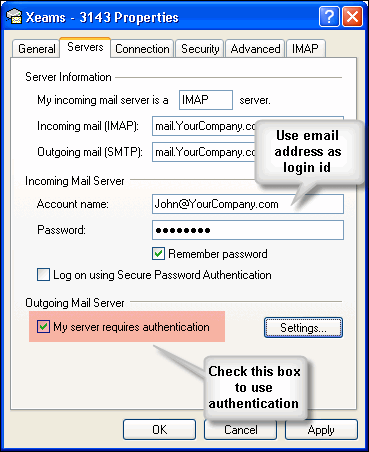
- Use John's email address for the Account Name and check the box for Outgoing mail server
- Refer to the following image showing what values to specify in your client. This screen may look different if you are using any other client.
User comments
Posted by Steve on 4/9/14 2:45 PM
This is correct, but only if sender or recipient is not on the same server. If the sender and the recipient are hosted at the same Xeams server - then you can send emails without authentication. This is a MEGA-BUG !
Posted by Paul on 5/10/16 2:56 AM
This works as it should, but what would be great is to force SMTP authentication for ALL incoming mail, even to local accounts, except from trusted hosts. Many people have a stand-alone spam filter that then delivers mail to the actual mail server, thus only need to allow un-authenticated SMTP from that one trusted host. All other SMTP connections are either spam attempts or legitimate users, in which case we want to force SMTP authentication for those users, even if they're sending to local users.
Posted by ThyTe on 9/22/16 3:02 PM
Sender rejected. [a@domain.com.br]550 5.7.1 Must Authenticate! . Typically, SMTP server's do not reject emails based on the sender's email. If the receiving end is under your control, check its logs to see why is it rejecting the sender.
Posted by Josh on 1/5/14 6:35 PM
After some testing, it seems like SMTP authentication is always on if relay is set to closed. Set the configuration to a closed relay and try to send an email and you get relaying denied. However, if you set your smtp server to log on, it will relay the email.
Posted by Dennis on 1/7/14 9:16 AM
This comment is for Josh.
This is exactly what SMTP authentication supposed to do. Without authentication relaying should be denied and with is should be accepted.
Add a comment to this document
Do you have a helpful tip related to this document that you'd like to share with other users?
Important: This area is reserved for useful tips. Therefore, do not post questions here. Instead, use our public forums to post questions.