
Document information
| Document ID: | 4581 |
|---|---|
| Subject: | Xeams Reports - Reporting capabilities in the email server |
| Creation date: | 12/14/15 4:35 PM |
| Last modified on: | 1/12/22 2:37 PM |
Reports
Several reports are available in Xeams that provide a wide variety of information to system administrators. Following table lists some of these reports.
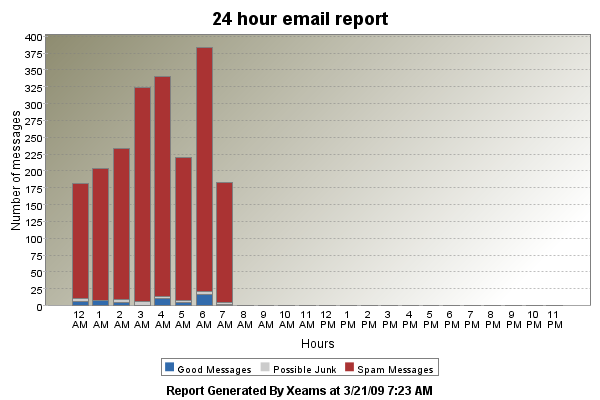
- Daily Report - This report displays the number of emails (Good, Junk and Possible junk) for a day. It plots an hourly activity since midnight. The graphical report is followed by textual data showing you the exact count of emails received in each hour.
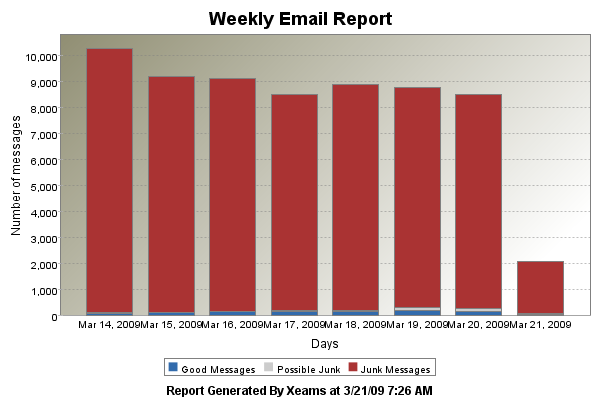
- Weekly Report - This is similar to the daily report but displays data for the past 7 days. The following graph shows the number of emails received on March 14 was little over 10,000 and most of them were junk.
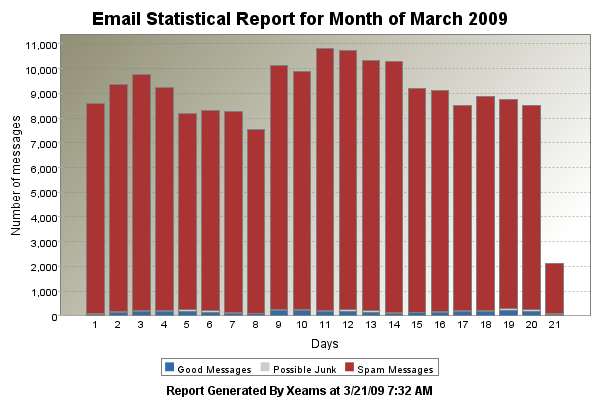
- Monthly Report - Another similar report containing data for a month. However, this report allows you to change the month allowing administrators to view past history.
- Yearly Report - Yet another report showing data for one year. Similar to Monthly report, this report allows you to change the year for which you want to display data.
- Activity by IP Address - This displays a summary of IP Address that sent junk messages to your server. This is not a graphical report. Additionally, this report allows administrators to black-list an IP address by just one click.
User comments
Posted by Babu Ramakrishnan on 10/16/16 2:01 AM
All Reports Xeams are very good. But how to convert these reports to .pdf or .doc formats.
Please reply.
Posted by Elton Rattan on 5/3/13 12:07 PM
It would be great to see a report based on domains. I have multiple domains being routed through the filter and I would like to see which domain has the most spam coming through it.
Add a comment to this document
Do you have a helpful tip related to this document that you'd like to share with other users?
Important: This area is reserved for useful tips. Therefore, do not post questions here. Instead, use our public forums to post questions.