
Document information
| Document ID: | 4642 |
|---|---|
| Subject: | Setting outbound SMTP port to other than 25 |
| Creation date: | 12/14/15 4:35 PM |
| Last modified on: | 4/7/22 11:11 AM |
Setting outbound SMTP port to a number other than 25
Typically, outbound emails are sent to port 25, which is the default value for SMTP protocol. Depending upon your network configuration you may want to send outbound traffic to a different port.
Consider the following scenario
- You are using Xeams in Firewall mode.
- You have configured your primary SMTP server to listen on port 2500.
- Due to some internal network complications you do not want to use the SMTP Proxy Server.
- You need to configure SMTP server to listen on port 25 and have it forward in-bound emails to port 2500, which is the SMTP port for your actual email address
- Login to Admin Console as administrator
- Click Manage Local Host File under Server Configuration
- Enter the desired domain name. This is typically the local domain handled by your actual SMTP server.
- Enter the IP address of your actual SMTP server followed by a colon and the port number.
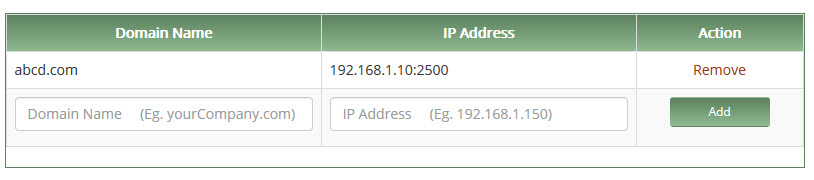
This example will force the SMTP server to send messages for abcd.com to a machine running on 192.168.1.10 on port 2500
Add a comment to this document
Do you have a helpful tip related to this document that you'd like to share with other users?
Important: This area is reserved for useful tips. Therefore, do not post questions here. Instead, use our public forums to post questions.