
Clustering/High Availability For Outbound Emails
Although the primary goal of clustering in Xeams is to synchronize filtering rules for inbound emails, it can also be used to view outbound or internal messages. This page demonstrates how to use Xeams in a clustered environment, enabling you to view all outbound messages from a single web interface.
Benefits of Clustering
Xeams displays messages it receives under its Message Repository. When clustered, Xeams can display messages from multiple nodes through a single web interface, making the administrative tasks easier.
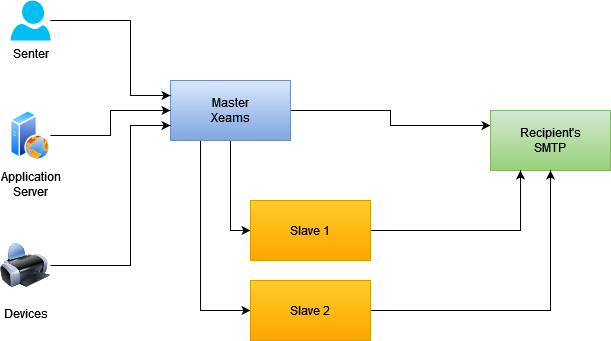
Load Balancing (LB) and High Availability (HA)
Using multiple Xeams in a clustered environment does not provide high availability. That must be done using either a DNS server or a load balancer.
Using DNS for Load Balancing
Using a DNS server is the easiest way to achieve load balancing. Assume you have two Xeams running on the following IP addresses:
10.10.10.10
10.10.10.20
In your DNS server, you add a single "A" record with multiple IP addresses. Then specify the FQDN for this "A" record as the SMTP server on the devices and servers that generate emails. Since the FQDN resolves to multiple IP addresses, the email client will use any of them to send its message. This mechanism provides almost a 50/50 distribution between the two nodes.
Using a Load Balancer
Using a dedicated load balancer device can provide a customized distribution. For example, it can route most traffic to the primary Xeams and contact the secondary Xeams only if the primary is down.
Why Xeams Cannot Provide LB/HA?
LB and HA must be provided before the SMTP traffic reaches Xeams. Assume your primary Xeams goes down. In such cases, you need a device sitting in front of Xeams that reroutes traffic to a different machine once it detects that the primary server is down.
Therefore, the only benefit of using clustered nodes in Xeams is to provide easier administration, rather than HA/LB.
Configuration Steps
- Enable clustering by following the instructions on this page.
- Go to Server Configuration/SMTP Configuration, select the Advanced tab, and check the box for Relay Through Clustered Slaves
Best Practices
Similar to the master Xeams, you will have to follow all the best practices for outbound emails on your slave servers, which includes:
- Ensuring the public IP address of the slave servers is in your SPF record.
- Create DKIM signatures on the slave with a different value for the selector. Note that every SMTP server should have a different selected, hence a different set of public/private keys for DKIM.
- Run Tools/Diagnostic Check - Outbound from your slaves servers to ensure every test passes.
Communication Logs
- Connect to your master Xeams
- Click Message Repository/View All Good to view messages that were recently processed.
- The outbound arrow is displayed in blue when messages are delivered through the slave. See the image
below for an example.
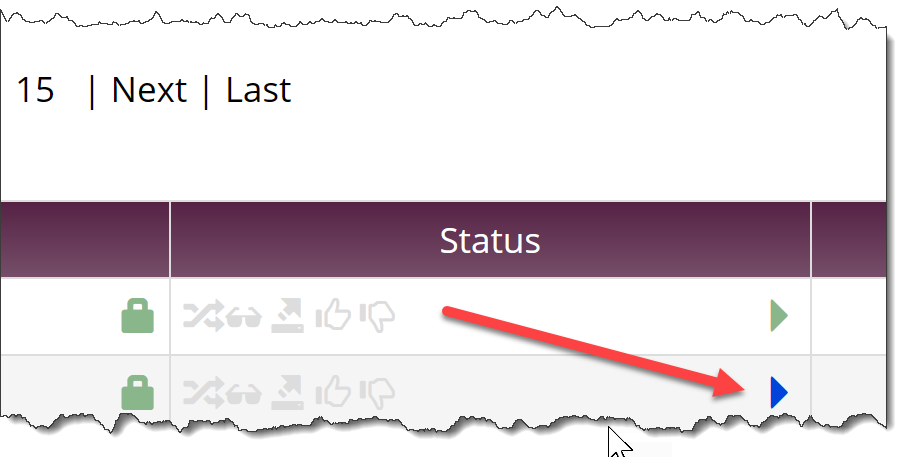
- Click the icon will display the logs, which will be pulled from the slave machine and displayed through the master's screen.