
DevNullSmtp A fake SMTP server for testing, debugging and troubleshooting email problems
As the name implies, DevNullSmtp is a dummy SMTP server that can be used for testing purposes. By default, Emails sent to DevNullSmtp are lost. It can be used to troubleshoot email related problemsThere are two variations of DevNullSmtp:
- Integrated with Xeams
- Stand-alone
- Add a new text file called
DevNullRecipients.txtin$INSTALL_DIR\configfolder - Add email addresses that are considered for DevNull - one address per line
- Xeams will accept emails for addresses specified in this file but the message will be lost. You will NOT see the message either in Live Monitor or Message Repository
- Needless to say, DO NOT put any important address in this file. Every email sent to these recipients will be lost
Recommended if you already have Xeams installed on the machine.
Instructions
- Download the zipped file.
- Extract the zipped file in the same folder where you have installed Xeams
- Double click DevNullSmtp.bat to run it
- Specify a port number and click Start Server
- By default, DevNullSmtp will run as an open relay - meaning it will accept messages for every domain and users.
- Specify desired domain names in the text box below to restrict DevNullSmtp to certain domains
- Specify complete email addresses to restrict recipients - meaning DevNullSmtp will only accept messages for these individuals
Stand-alone Windows executable. Recommended if you don't have Java or Xeams on the machine.
Instructions
- This EXE will only work on 64-bit version of Windows. This is not an installer but a self-contained executable file.
- Double click DevNullSmtp.exe to run it. It may take a few seconds to open up.
- Specify a port number and click Start Server
- By default, DevNullSmtp will run as an open relay - meaning it will accept messages for every domain and users.
- Specify desired domain names in the text box below to restrict DevNullSmtp to certain domains
- Specify complete email addresses to restrict recipients - meaning DevNullSmtp will only accept messages for these individuals
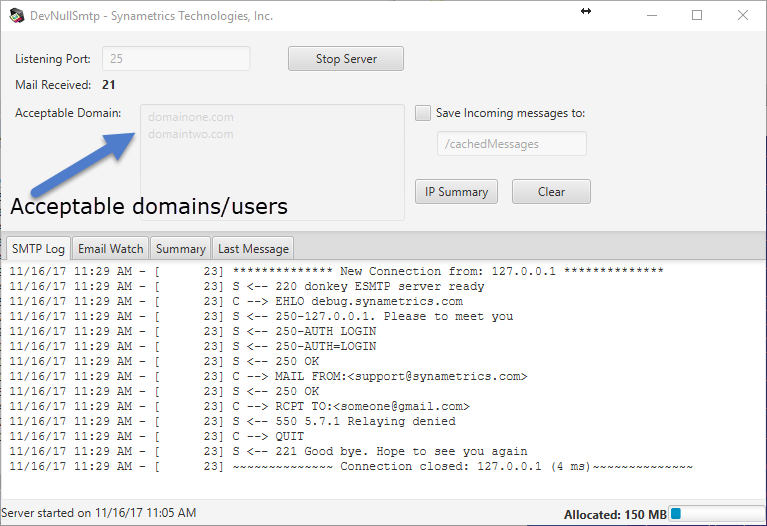
How it works
- The screenshot on the left shows DevNullSmtp running on port 25 and accepts messages for
domainone.comanddomaintwo.com - The log shows an incoming email that was supposed to be delivered to
someone@gmail.com. It was denied by DevNullSmtp is not configured to accept emails for that domain. - Check Save incoming messages to box and specify a path on the local machine if you want to save incoming messages.
- This version of DevNullSmtp is newer than the version found on http://www.aboutmyip.com/AboutMyXApp/DevNullSmtp.jsp
Note
Console Mode will NOT work with the EXE version of this program.There are several benefits of running DevNullSmtp in a console mode, without any GUI. For example, you want to run it in console mode when:
- Running on headless Linux
- Through a script
- Unit testing
Invoking in Console Mode
Simply pass -console as a command line argument in order to run DevNullSmtp in non-gui mode. For example:
java -jar DevNullSmtp.jar -console
Additionally, following command-line arguments are supported when running in console mode
| Argument | Description |
|---|---|
-p |
TCP/IP Port. If missing, 25 is assumed. |
-d |
Comma separated value for acceptable domains. If missing, the server will run as an open-relay. |
-s |
Path on disk where emails are saved. If missing, emails will not be saved. |
-tr |
Sender's email address to terminate DevNullSmtp. An incoming email where sender's email address equals this value will cause DevNullSmtp to terminate. |
Examples
Example 1 - Start listening on port 587 and save incoming emails to /testEmails.
java -jar DevNullSmtp.jar -console -p 587 -s /testEmails
Example 2 - Start listening on port 25 as an open relay. Terminate application if the sender of an incoming email
is terminate@me.please.
java -jar DevNullSmtp.jar -console -tr terminate@me.please
SSL Certificate for STARTTLS
DevNullSmtp supports STARTTLS by default, and uses a self-signed certificate.
Use the following command line argument to disable STARTTLS:
java -Ddevnull.disable.starttls=true -jar DevNullSmtp.jar
Use the following command line arguments to specify a custom SSL certificate:
java -Ddevnull.cert.pwd=secret -Ddevnull.cert.type=PKCS12 -Ddevnull.cert.file=path/to/certificate.pfx -jar DevNullSmtp.jarYour certificate must be in binary format, such as *.pfx and must include the primary key. If you're certificate is in ASCII, you must convert it to a binary format using instructions on this page
Simulating Delays
It is often helpful to see how your application behaves when the receiving SMTP server runs into errors. For example, what happens when the receiving server takes a long time after accepting the DATA command? You can simulate fake delays in DevNull, allowing you to test such scenarios. Delays can be added to the following commands, each with its own system property tag:
- HELO -
smtp.sleep.time.after.helo.plain, orsmtp.sleep.time.after.helo.encfor helo after STARTTLS - MAIL FROM -
smtp.sleep.time.after.mailfrom - RCPT TO -
smtp.sleep.time.after.rcptto - DATA -
smtp.sleep.time.after.data
java "-Dsmtp.sleep.time.after.data=60000" -jar .\DevNullSmtp.jar
In this case, a new system property called smtp.sleep.time.after.data is added with a value of 60000,
representing the number of milliseconds. When DevNull receives an email, it will go to sleep for 1 minute after the DATA command.