
Incoming and Outgoing Daily Summary Report
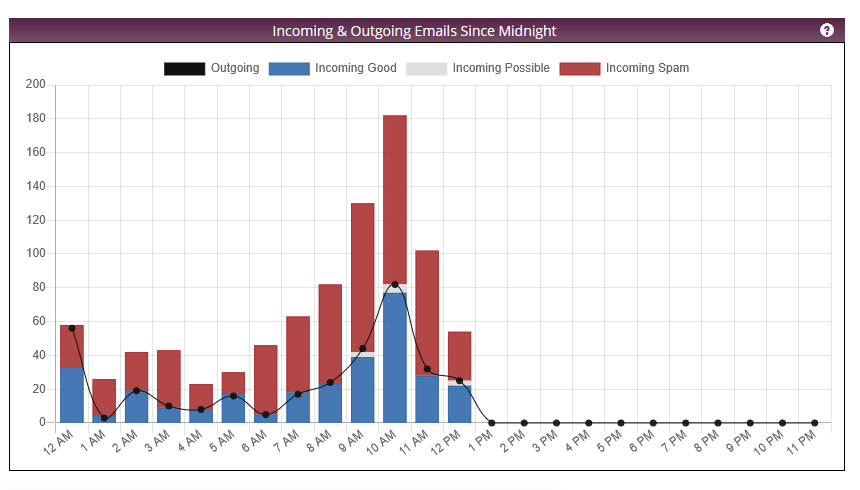
The home page of Xeams displays a graph showing the incoming vs outgoing emails since midnight. This page discusses the information displayed on this graph. The following image shows a sample graph.
It is important to understand the distinction between incoming and inbound, and between outgoing and outbound.
- Incoming Messages - These messages are received by Xeams from other SMTP clients or servers acting as clients. For example, from a printer device, from an email client such as MS Outlook, or another SMTP server. The sender's and/or recipient's domain name is irrelevant when discussing Incoming messages.
- Inbound Messages - This term refers to the direction of the email, which is determined by the recipient's domain name. For example, when an email is sent from someone@gmail.com to someone@yourdomain.com. If the recipient of this email is on your domain, it is referred to as inbound email.
- Outgoing Messages - Whenever an email is sent out from Xeams, it is referred to as Outoing. Similar to Incoming messages, the sender's and/or recipient's domain name is irrelevant.
- Outbound Messages - Similar to Inbound Messages, this term is based on the recipient's domain. If the recipient belongs to a foreign domain, it is called Outbound.
The graph above shows only Incoming and Outgoing emails. It does not talk about Inbound and Outbound.
Incoming Messages
Whenever Xeams receives a message, it places it in one of three categories: Good, Spam, or Possible Spam. These messages are displayed in the bar chart in the image, which is colored by category. If spam filtering is turned off, every message goes into the Good category; therefore, the bar chart will contain only one color, representing Good messages.
Outgoing Messages
These messages are represented by black dots. In most cases, the number of outgoing messages will hover very close to the number of incoming messages. However, consider the following reasons when this value will deviate from the incoming count:
- System-generated messages are never received but go out and therefore can increase that count.
- Spam messages, which are quarantined instead of going out.
- When a single message is received for multiple recipients in the CC field. Consider an example in which a sender composes one email with 4 recipients in the To or Cc field. In this case, the incoming count is one, but the outgoing count will be four.