
Integrating your AI-Powered Solution with an Email Server
The development and use of AI have been increasing significantly. Over time, improvements to these models have accelerated; more and more businesses now utilize AI to enhance workflows and improve client experiences. With such development, the number of different AI Agents and services are plenty. There are AI agents for numerous tasks, such as scheduling, coding, research, email handling, cybersecurity, finance, automation, and more.
The problem arises when multiple tasks need to be done. Every AI agent needs access to tools, and every tool has its own interface. Eventually, the number of tools needed to perform your tasks can increase tremendously, leading to complications.
To solve this issue, a standard named MCP is now being used.
What is MCP, and why is it being used?
The Model Context Protocol (MCP) was introduced in late 2024 and standardizes the connection of AI systems to external tools, data sources, and services.The idea behind MCP is similar to giving AI agents a universal port (Think of a USB). Instead of writing one-off integrations for each new service (APIs, databases, cloud services, etc.), MCP provides a standardized way to connect AI applications to external systems.
Here are some advantages of using MCP:
- Unified Interface: Developers don't have to write connectors for every API or service. Once a service has an MCP server, any MCP-compatible AI client can use it. This reduces excessive maintenance and overhead.
- Improved Security: MCP will fetch data only when required. Since the data is not stored, this prevents information breaches and compliance risks.
- Flexibility & Extensibility: It is easy to add new capabilities to an AI system by plugging in new MCP servers without rewriting the main application.
- Better Accuracy: Because MCP supports real-time communication, LLMs can retrieve data in real time rather than relying on pre-cached or indexed datasets, which quickly become outdated. Since the AI retrieves the latest information, this reduces the risk of incorrect or stale responses.
Integrating MCP with an Email Server
Email servers can be used with an MCP to enhance their functionality. This is done by modifying the MCP Tool to connect to an email server's API. Certain tasks can be completed by the MCP, thereby reducing the work required of the administrator. In the MCP architecture, there are three primary components: the MCP Host, the MCP Client, and the MCP Server.To help define the role of each MCP section, the demonstration below will utilize all three components to enhance an email server.
1. Installing MCP Server.
The MCP Server is an external service that presents tools, actions, commands, or data the AI can use. This server handles the logic of interacting with the actual API, database, or service. In this example, we will use the Xeams MCP Server, provided by Synametrics.This MCP Server works with an existing Xeams Server by connecting to the Xeams API. The MCP and instructions are available at this page. Once the instructions in the article above are followed, the MCP Server is set up and ready to use with an email server. The next part is to integrate with Xeams.
2. Configuring Email Server with MCP.
The MCP Server now requires an email server to be integrated with. In the above example, the Xeams MCP Server is installed and configured. Since this MCP only works with Xeams, we will use Xeams as the email server. Many email servers provide APIs that MCP Servers can connect to: Xeams is no exception. Once Xeams is up and running, configure the API plugin and create a new API key.Please follow the steps here to achieve this. Once the key is created, Xeams will display the API Key and the Secret value. These values will then need to be integrated into the .env file in the Xeams MCP Server. Once the API is integrated, configuring the MCP Host is the last step.
3. Installing and Using MCP Host
The MCP Server and the Email Server can now be integrated with an MCP Host. The host is an AI application that runs the LLM. The MCP Hosts include the MCP client, which is a part inside the host that knows how to communicate with the Server by sending requests and receiving results.One example of an MCP Host is Claude Desktop. Once Claude is installed, this Host can be integrated with Xeams by modifying the Configuration. The full instructions to achieve this are on this section.
4. Using Claude with MCP
Once all three systems are integrated, Claude can be used to perform administrative tasks. Here's an example of validating if an email address exists: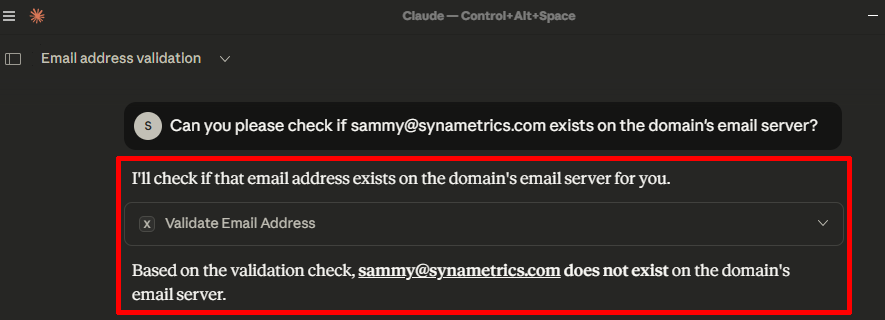
The MCP Server can also check the status of an email. Here is an example below:
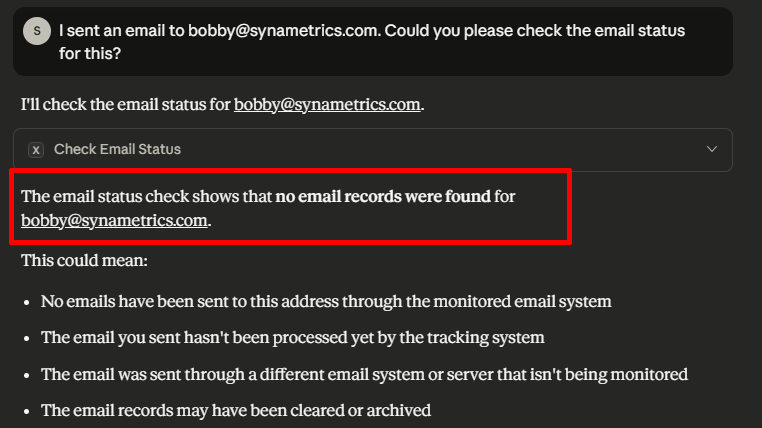
In the above, no emails were found. This is useful for letting the administrator know that something went wrong with the email.
Conclusion
As more organizations adopt AI-driven tools, there is a need for a unified, reliable, and secure role to connect those tools to backend systems. This is exactly where the MCP fills this role. By acting as a standardized middle layer between AI agents and your email server's API, MCP eliminates excessive overhead, simplifies workflows, and makes automation both powerful and safer.For email servers with APIs, MCP becomes an essential tool. It enhances security, reduces repetitive manual tasks, and provides greater accuracy when configuring settings. Whether you're validating email addresses or confirming an email delivery, MCP transforms these operations into standardized, highly automatable workflows.
| Created on: | Dec 12, 2025 |
| Last updated on: | Dec 12, 2025 |