
Restarting Xeams Automatically After a Certain Time
This page explains a procedure that automatically restarts Xeams after it has run for a specified number of hours. Restarting Xeams clears up any cache and memory buffers in Xeams, which is useful in certain scenarios.
Steps
- Stop Xeams
- Locate the AppConfig.xml file in the $INSTALL_DIR\config folder. $INSTALL_DIR refers to the folder where Xeams is installed: C:\Xeams on Windows and /opt/Xeams on Linux.
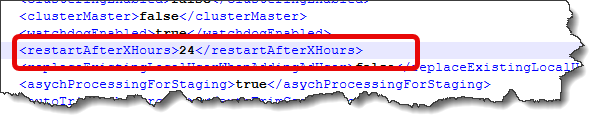
- Search for restartAfterXHours
- Change its value to a number representing the number of hours to restart after. For example, if this is set to 24, Xeams will restart once every 24 hours. Refer to the image below, displaying how to modify this field.
- Save
- Restart Xeams